Stripe setup is the ultimate gateway for businesses looking to streamline their online payment processing. This innovative platform simplifies Stripe account creation, allowing entrepreneurs to efficiently manage transactions and payments. Whether you’re wondering how to set up Stripe for your online store or harnessing its robust features for businesses, you’ve come to the right place. This guide will walk you through the intricacies of integrating Stripe, ensuring a seamless experience from start to finish. By leveraging Stripe’s capabilities, you can elevate your business’s payment processing to new heights.
Initiating your journey with the Stripe payment platform is not only straightforward but also packed with powerful tools designed for growth. Establishing your merchant account—often referred to as account registration—opens up a world of payment solutions that cater to diverse business needs. By exploring Stripe’s functionalities, you can discover various methods of incorporation, enhancing customer experience and operational efficiency. This guide aims to provide you with an insightful overview of everything you need to know about adopting this payment processing system. Preparing your business for this transition means you’re not just setting up a payment solution; you’re empowering your business to thrive in the digital market.
Applying for a merchant account is a crucial step for any business looking to accept credit and debit card payments. To begin the application process, you will first need to select a payment processor that fits your business needs. This involves reviewing different providers, comparing their fees, transaction rates, and customer support. Once you’ve chosen a provider, you typically need to fill out an online application that requests information about your business, including its legal structure, business type, estimated monthly sales, and any previous payment processing history. It’s essential to have your business documents ready, such as your Employer Identification Number (EIN), business licenses, and bank account information, as these will be required for verification purposes.
After submitting your application, the payment processor will conduct a review, which can take anywhere from a few hours to a few days. During this time, they may reach out for additional information or clarification about your business operations. Once your application is approved, you will receive information on how to set up the necessary hardware and software for processing transactions. Be sure to also familiarize yourself with the terms and conditions, as they outline important details regarding fees, chargebacks, and customer support. For more detailed guidance on applying for a merchant account and to start your application, visit [your chosen payment processor’s website].
Mastering the Art of Stripe Account Creation
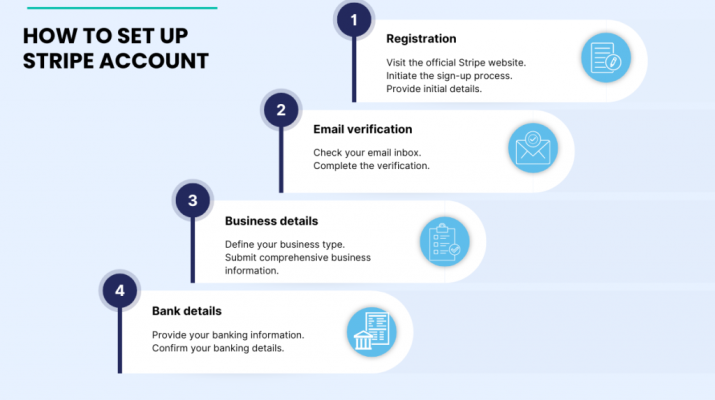
Creating your Stripe account is like opening the door to a digital marketplace teeming with opportunities. Just as a painter prepares their canvas with a pristine base, the first step for any entrepreneur is to set up an account that provides not just security but also functionality. Start by visiting the Stripe website and initiating your account creation; this step is vital as it lays the foundation for every transaction that follows. The process is designed to be intuitive, requiring only an email and a secure password, akin to sketching the first lines of a masterpiece.
As you step into the Stripe dashboard, visualize it as your artistic studio where every financial detail is within reach. This dashboard is tailored to empower you as a creator, allowing you to manage your payments seamlessly amidst the bustling world of e-commerce. Within this platform, you can monitor transactions, analyze customer interactions, and fine-tune your payment processing approach, much like an artist adjusting their brush strokes to perfect a painting.
Unlocking the Essential Business Information for Stripe
When setting up your Stripe account, think of the necessary business information as the colors on your palette, each essential for creating a vibrant work of art. Just as an artist must choose their hues wisely to craft a stunning visual, you will need to provide Stripe with details such as your business type, tax identification number, and bank account information. This transparency is critical as it shapes how Stripe will handle your payments, ensuring transactions flow smoothly and efficiently.
Furthermore, the verification phase is akin to an artist presenting their credentials to a gallery—it’s a crucial step to gaining trust and legitimacy. By providing documentation like your government ID or business registration, you affirm your commitment to compliance and business integrity. Just as an artist showcases their authenticity, this process solidifies your credibility in the eyes of your customers and partners.
Integrating Stripe: A Seamless Connection for Your Business
Integrating Stripe into your existing systems is much like blending various art mediums to create a harmonious piece. With its robust APIs and pre-built solutions, Stripe enables businesses to customize their payment experiences, ensuring versatility in both appearance and functionality. Whether you are a developer crafting unique applications or a small business owner seeking simplicity, Stripe provides tools that feel like natural extensions of your business operations.
Using Stripe’s API can be compared to a sculptor chiseling away at a block of marble, revealing the form within. Each integration option allows for a refined approach to payment processing; pre-built solutions like Stripe Checkout streamline the experience without heavy coding, much like using molds to shape clay into an exquisite form. This balance between customization and accessibility makes integrating Stripe not just efficient, but an opportunity to craft a distinctive customer journey.
Navigating the World of Stripe Fees and Payouts
Understanding Stripe’s fees can be likened to a financial artist meticulously weighing their materials before embarking on a project. Stripe’s transparent pricing model ensures that businesses can anticipate costs effectively, enabling better financial planning. The standard transaction fees, which typically hover around 2.9% plus $0.30, must be accounted for just as an artist calculates their budget for materials and studio time.
Payout schedules can be compared to waiting for paint to dry before revealing a new artwork. Stripe processes payouts regularly, usually every two days, ensuring that your funds are not locked away, but rather flowing in and out in a predictable rhythm. This timely aspect of payment processing allows businesses to maintain their cash flow, akin to an artist receiving payments promptly for commissioned pieces, enabling them to sustain their creative endeavors.
Ensuring Security: The Cornerstone of Stripe
Security in payment processing is like the protective varnish applied over an artwork; it shields it from damage while enhancing its longevity. Stripe adheres to stringent PCI-DSS compliance standards, much like how an artist must ensure safe practices in their studio, safeguarding their creations and business. The encryption of sensitive data provides a layer of protection that is vital for building customer trust.
Moreover, Stripe’s fraud prevention tools act as vigilant guardians, monitoring transactions much like an artist keeping an eye on their gallery for potential threats. This proactive approach, combined with secure data handling, allows businesses to focus on growth without the fear of data breaches—a vital element in nurturing both creativity and commerce.
| Key Points |
|---|
| Setting up your merchant account with Stripe is straightforward and user-friendly. |
| You need basic business information like type, TIN, and bank details to start. |
| Stripe offers integration options like API integration, pre-built solutions, and plugins. |
| Stripe’s transparent pricing includes transaction fees and a rolling payout schedule. |
| Security features include PCI-DSS compliance, data encryption, and fraud prevention tools. |
| Extensive customer support is available through a help center, community forums, and direct support. |
| Stripe is continually evolving to enhance user experience and expand global transaction capabilities. |
Summary
Stripe Setup is a journey that beckons business owners to venture into the realm of digital commerce without fear. Much like a seasoned sailor charting a course through uncharted waters, you can navigate the setup process with clarity and confidence. With a few swift strokes, you create your account, set up your dashboard, and provide necessary business details as if laying the foundation for a sturdy ship. Integrate with ease, understanding the currents of fees and payouts as you sail towards security and support that Anchor your enterprise. With each update, Stripe evolves like the tides, offering you seamless tools to expand your reach across the vast ocean of e-commerce. Truly, the art of Stripe Setup is not merely a task; it is the very craft of building your business’s future.
Frequently Asked Questions
What are the steps for Stripe account creation?
To create a Stripe account, visit the Stripe website, click on ‘Sign Up,’ and fill in your email address and password. After confirming your email, you’ll access the Stripe dashboard to begin setting up your payment processing.
How do I integrate Stripe into my website?
Integrating Stripe into your website can be done via API integration or using pre-built solutions like Stripe Checkout. For custom integrations, refer to Stripe’s comprehensive documentation which guides you through setting up and customizing your payment experience.
What are the key features of Stripe for businesses?
Stripe offers numerous features tailored for businesses, including customizable payment APIs, support for multiple currencies, fraud prevention tools, and the ability to manage subscriptions. This makes it a great choice for businesses of all sizes.
What are the typical fees associated with Stripe payment processing?
Stripe operates on a pay-as-you-go model, typically charging 2.9% plus $0.30 per successful card transaction in the US. Additional fees apply for international transactions and currency conversions, so businesses should be aware of these costs when setting up their account.
Is there customer support available for Stripe setup issues?
Yes, Stripe offers extensive customer support resources, including a detailed Help Center, community forums, and direct support through email or chat. This ensures that users can find answers to their questions and resolve any issues during the Stripe setup process.
Creating a Stripe account is the first step towards seamlessly processing payments online. To get started, visit the Stripe website and click on the “Sign Up” button. You will be prompted to provide your email address, set a password, and verify your email. After that, you’ll need to fill out additional details such as your business name, address, and phone number. Validating the information related to your business is crucial, as Stripe will require it to comply with financial regulations and enable payment processing soon after account approval.
Stripe payment processing offers a simple, yet robust solution for online transactions, catering to businesses of all sizes. Once you have an account, you can start accepting various payment methods, including credit cards, debit cards, and even local payment options. Stripe also provides easy-to-use APIs that allow developers to customize and integrate the payment processing system into their websites or applications, ensuring a smooth checkout experience for customers. With advanced fraud protection and secure encryption technology, businesses can safely handle transactions while minimizing risks.
Setting up Stripe is straightforward and generally involves a few key steps post-account creation. First, you need to integrate Stripe’s APIs into your e-commerce website. This can be achieved by using libraries and plugins that Stripe offers for popular platforms like Shopify or WooCommerce. After integration, configure your payment options in the dashboard, such as enabling various payment methods and customizing the checkout interface. Additionally, it’s important to run test transactions using Stripe’s test mode before ‘going live’ to ensure everything functions correctly.
Stripe comes packed with numerous features designed to support businesses in adopting modern payment solutions. These include tools for accepting one-time payments, implementing subscription models, and handling invoices. Stripe also provides robust analytics and reporting features that help businesses track sales and monitor performance. Moreover, businesses can benefit from features like checkout customization, automatic currency conversions, recurring billing, and support for international payments through localized methods. Each feature is designed to enhance the flexibility of financial operations, making Stripe a powerful ally for businesses.
Integrating Stripe into your website or application can be done using various methods, depending on your technical expertise and business requirements. For developers, utilizing Stripe’s extensive APIs is the go-to option, allowing for deep customization; this can be integrated with back-end technologies like Node.js, Ruby, or PHP. Alternatively, e-commerce platforms may provide ready-to-use plugins that simplify the setup process. For those seeking a quick solution without coding, Stripe Elements or Stripe Checkout offer pre-built UI components for rapid deployment. Whichever integration method you choose, Stripe’s documentation offers comprehensive guidance to ensure a smooth implementation.
Setting up a merchant account with Stripe is a streamlined process designed to accommodate the needs of various businesses. Stripe, which has gained prominence as one of the foremost payment processing platforms, offers an intuitive user interface and comprehensive support resources. As you embark on this journey, you will find that creating an account is both quick and hassle-free, allowing you to focus more on your business rather than on complex setups.
After registering, the Stripe dashboard will become your central hub, providing you with tools to manage transactions, customer interactions, and much more. This dashboard is designed with an eye toward ease of use, ensuring that even those new to online payment processing can navigate it effectively. Here, you will be able to view essential data and metrics that can inform your business decisions and help you grow.
In order to utilize Stripe’s services effectively, you will be required to provide detailed business information. This includes your business type, tax identification, and bank account details. This stage is crucial as it establishes how Stripe interacts with your transactions and payouts. It’s essential to have your documentation ready, as Stripe’s verification process will involve checks that comply with financial regulations, ensuring both your security and that of your customers.
The flexibility that Stripe offers in integration options is one of its standout features. Whether you are tech-savvy and prefer to use the API for a tailored payment solution or need a quick and easy setup with Stripe Checkout, there’s an option for every need. In addition, if your business is hosted on platforms like Shopify or WooCommerce, Stripe’s official plugins enable seamless integration without the need for extensive coding.
Understanding Stripe’s fee structure is vital for managing your business finances. Their transparent pricing model, which is typically a 2.9% plus $0.30 per successful transaction in the U.S., allows businesses to budget effectively. Additional fees may apply for international transactions, and the payout schedule usually runs on a rolling basis. Being well-informed about these fees will help you to manage cash flow and plan for expenses as your sales scale up.
Security is another area where Stripe shines, thanks to its adherence to PCI-DSS compliance and other robust security measures. With features like data encryption and fraud prevention tools at your disposal, you can ensure that both your customers’ and your business’s sensitive information stays protected. Building trust through security will not only safeguard transactions but also enhance your customer relationships.
In addition to having extensive support resources, Stripe offers various avenues for assistance, ensuring that you are never left to navigate challenges alone. From a well-structured Help Center and community forums to direct support options via email and chat, Stripe makes it easier for users to find solutions to any questions or problems encountered during setup and beyond.
Looking towards current trends, Stripe is continuously innovating to improve user experience, particularly in mobile payments and expanding support for international transactions. This is increasingly important in today’s global marketplace as more businesses look to reach international audiences. Keeping abreast of Stripe’s updates will allow you to take advantage of new functionalities and improvements as they become available.
In summary, the process of setting up a merchant account with Stripe is designed to be straightforward and user-friendly, catering to the diverse needs of businesses from various sectors. With this guide, you should feel empowered to tackle your Stripe setup confidently, gaining an understanding of its key features and what to expect as you begin your payment processing journey. Starting today could be the first step towards enhancing your business’s operational capabilities with one of the leading platforms available.